
How to Choose a Fluorescence Intraoral Camera: 5 Demo Checks
If you're working out how to choose a fluorescence intraoral camera, you probably have a spec sheet open in another tab: resolution, light source, weight. Those numbers matter, but they rarely predict what decides the camera's real value: whether it's still part of your hygiene routine six months from now or sitting in a drawer. That depends on questions a spec sheet doesn't answer. Can you recapture the same tooth under the same conditions next visit? Does the image become a record you can pull up and explain? Can your team fit it into a real schedule? This intraoral camera buyer's guide turns those questions into five checks you can run in any demo.
What should an intraoral camera buyer's guide start with?
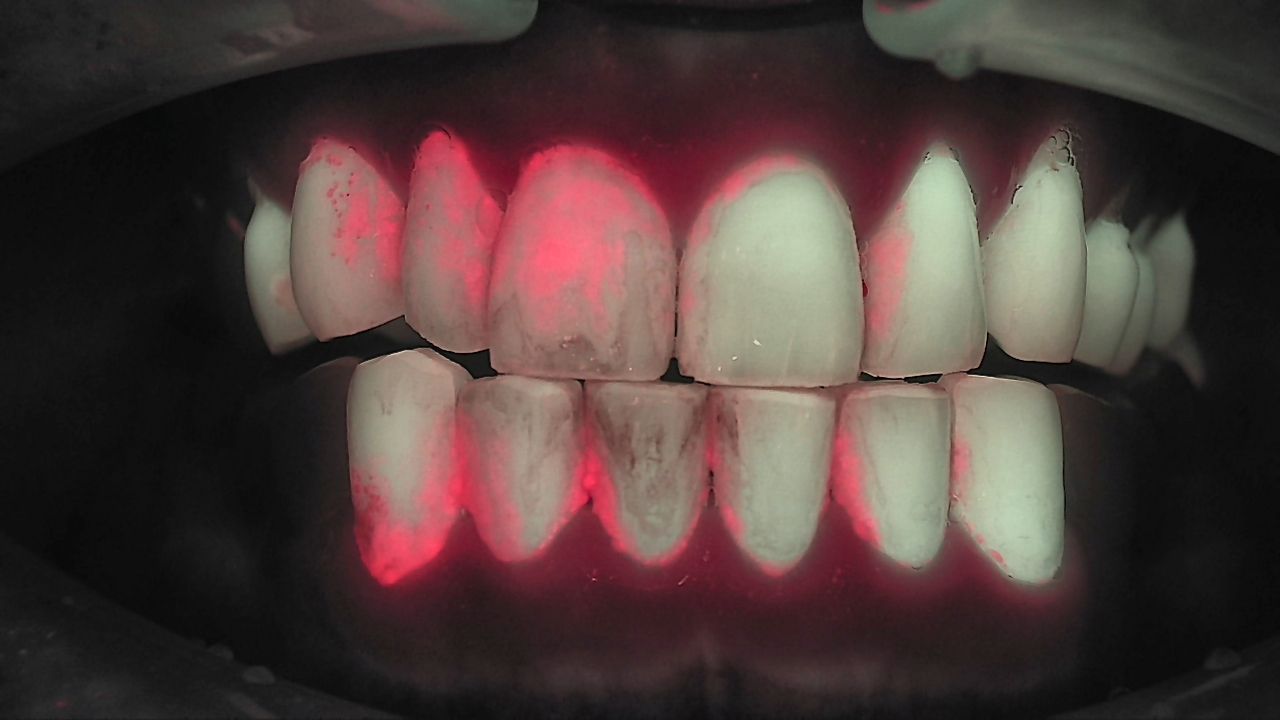
A fluorescence intraoral camera isn't a diagnostic machine. It's where you and the patient start looking together. Under 405 nm light, sound enamel fluoresces green, mature biofilm fluoresces red, and early demineralization shows as a loss of fluorescence. That image is a reason to look closer; the diagnosis still comes from the dentist, together with the visual exam and radiographs. So the useful question isn't only "how sharp is the image?" It's "how does this device help me understand the patient's current condition and decide the next step of care?"
Map the device to four steps and look for where the chain breaks. Observe, record, compare and explain, carry it forward. A sharp image you can't reproduce next time breaks the comparison. An image that never reaches the chart ends the conversation the day it's taken. The five checks below follow that chain.
| Check | The question to ask in the demo | How to test it |
|---|---|---|
| 1. Scope | Does my practice mostly screen whole mouths, or look closely at single teeth? | Walk through last week's schedule (recalls, new patients, emergencies) and match each device to it |
| 2. Repeatability | Can I recapture the same tooth under the same conditions? | Capture one tooth twice and compare distance, angle and brightness side by side |
| 3. Records | Do white-light and Qray fluorescence images stay paired and reach the chart and the patient? | Follow one image on screen from capture to storage to next-visit comparison |
| 4. Team | Can hygienists capture and the dentist confirm without stretching the appointment? | Have one of your own team members capture and time it |
| 5. Evidence and limits | Is there published research on this model, and does the rep explain when it won't show something? | Ask for the citations and for the cases where radiographs are still needed |
Check 1: Qraycam Pro vs Qraypen C, which one first?
If your day is mostly full-arch screening, start with Qraycam Pro. If it's mostly one tooth at a time, start with Qraypen C. Qraycam Pro captures the full dental arch in Qray fluorescence; Qraypen C is a pen-style device for fluorescence and high-resolution images of specific teeth. Same principle, different field of view, so the deciding factor is the patient mix you already have. For all four devices, see Qray Intraoral Camera Lineup: Which Device, When?.
| Your practice looks like this | Start by evaluating | Why |
|---|---|---|
| A busy hygiene department with lots of recall and prophy patients | Qraycam Pro | A pre-prophy full-arch capture becomes the baseline for home-care coaching and the next recall |
| Symptomatic teeth, suspected cracks, single-tooth restorative work | Qraypen C | Easy to get close to the area of interest and document before, during and after treatment |
| Many pediatric or adolescent patients | Qraycam Pro | Cooperation windows are short, so a fast whole-mouth pass matters |
| Several operatories, and you want a device within reach at each chair | Qraypen C | A pen-style device is easy to keep chairside; some practices place one per operatory |
Practices that use both tend to screen wide, then zoom in. In one clinical case, the team captures the full arch with Qraycam Pro before the prophy, uses Qrayview Pro during scaling to check whether red biofilm remains, then recaptures suspicious areas with Qraypen C so the dentist can make the call. A Kyung Hee University team that imaged the same lesions in 178 teeth from 61 patients with both devices reached a similar conclusion: use the wide-field capture for screening, then evaluate lesion depth in the selected teeth with additional imaging and radiographs.
Checks 2 and 3: a QLF camera checklist for repeatability and records
Qray fluorescence is compared across repeat captures, so the second image matching the first matters more than how sharp the first one looks. In the demo, capture a tooth, set the device down, capture it again, and put the two images side by side. If distance, angle or brightness shift a lot, your next-visit comparisons will too. Four capture rules:
- Darken the room.
- Retract lips, tongue and saliva away from the target tooth.
- Clean the surface before you capture.
- Keep distance and angle consistent; with Qraypen C, the W-block fixes the camera position while your team practices.
Technique and placement are part of repeatability. Tap and pull away like a regular intraoral camera and you may not collect enough fluorescence; focus under white light, then hold for a second or two. Ambient light from the operatory light or a sunny window can wash the whole image red, so Qraycam Pro belongs in an operatory where light is easy to control, with the overhead light off during capture. In one clinical case, a wireless switch turns off only the lights around that chair. Run the demo in the operatory you'll actually use, under your normal lighting.
Check 3: make sure white-light and Qray fluorescence images stay paired. Patients nod at a white-light photo. Show them the same spot glowing red and they ask, "What is that?" That conversation needs both images. Qraycam Pro captures a white-light image and a Qray fluorescence image in sequence, and Qraypen C offers a mode that captures a standard image and a Qray fluorescence image together.
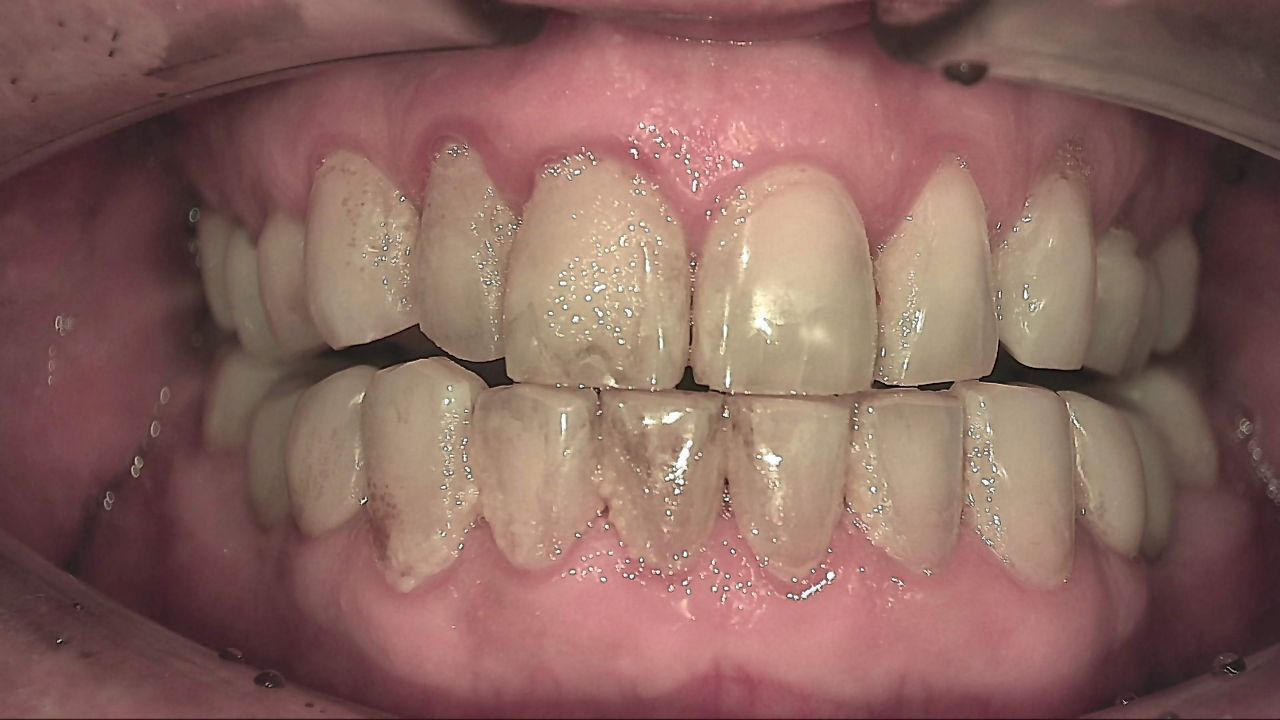
Plaque that blends into the tooth color under white light separates out as red under Qray fluorescence. The red follows the cervical margins and interproximal areas of the lower anteriors and parts of the upper anterior surfaces. Red fluorescence is a reason to look at mature biofilm more closely; on its own it doesn't establish disease or the need for treatment.
Follow the image through the software. Is it saved under the right patient? Can you pull up the same site next visit and set the two side by side? Can it go to the patient as a report? Images captured with Qray devices are recorded in LINKDENS and can be sent to the patient as a report. How images move between the camera software and your practice management or imaging software varies by setup, so ask to see it with the system you actually run. Note that Qrayview Pro doesn't store images; it's for a quick chairside check that red biofilm is gone. Qscan Plus is a personal device patients use at home. If records and comparison are the goal, Qraycam Pro and Qraypen C are the starting point.
Check 4: who captures, and who explains, in week one?
A camera that's installed but not used gives you nothing. Adoption is won or lost in the first week. A simple plan:
- Let the team image each other first. A hygienist who has seen red along their own gumline has something real to say to patients.
- Assign roles. Hygienists capture, explain and document; the dentist reviews and confirms; the assistant pulls up previous images side by side; the front desk explains what the next visit is for.
- Image every new patient and every recall. Pick and choose, and it never becomes routine.
- Review together after one week: what slowed you down, and which explanations landed.
Time the capture with your own team's hands. Once the team is comfortable, a full-arch Qraycam Pro series often takes just a few minutes, but the first weeks take longer. In one clinical case, the dentist kept encouraging staff through the clumsy early images, their skills steadily improved, and what mattered most in the end was making capture routine.
Don't overthink the colors. Red fluorescence doesn't automatically mean disease. Think of a traffic light: red is a signal to look together and start managing that area, not a verdict. Treat the camera like your loupes, an aid that helps you see. In one clinical case, on the first day after installation, the dentist showed a patient an area of secondary caries that would normally have been a "watch it if it doesn't hurt" conversation, and the patient asked about it first. When patients see the same screen you do, they have something of their own to weigh.
Check 5: dental camera demo questions about evidence and limits
A credible demo covers the limits along with the strengths. Ask two dental camera demo questions: "What research has been published on this model?" and "When won't it show something?" For example, a cross-sectional study from Türkiye evaluated Qraycam Pro for occlusal and proximal caries in 120 teeth from 60 patients, against visual-tactile criteria and bitewing radiographs. The authors concluded it can serve as a screening aid, and in the same breath noted that it is technique-sensitive and needs a controlled capture environment and defined criteria. That's exactly why Check 2 belongs in the demo.
Knowing what it won't show prevents surprises. A proximal lesion can be masked by overlying enamel and not appear red, so confirm with radiographs; a recent crack may not show red fluorescence yet. Qray fluorescence doesn't replace radiographs: it adds functional information about biofilm and demineralization, radiographs show structure, and the dentist reads them together. Listen for whether the device is described within "it shows, the dentist decides."
What's next
Once the five checks are done, one question is left: will today's image be used again at the next visit? White-light and Qray fluorescence images from Qray devices are recorded in LINKDENS and can reach the patient as a report, so next time you can recapture the same site under the same conditions and set the two side by side. For a practice owner, that's where the value shows up: not in a single capture, but in a record that carries the team's explanation forward to an agreed time to look again. That's what moving from reactive to proactive care means day to day. It isn't treating earlier; it's keeping a baseline, explaining change, and deciding together when to check next. No device can guarantee more rebooking or higher case acceptance, but the reason the patient is coming back becomes clear. As that comparison continues visit after visit and carries into continuous care through QBLISScare, a fluorescence intraoral camera stops being a one-time exam tool and becomes the starting point of ongoing care.
FAQ
Q. Qraycam Pro vs Qraypen C: if I can only start with one, which should it be?
A. It depends on your patient mix. If recall and prophy patients drive your day and full-arch explanations matter, start with Qraycam Pro. If you mostly look closely at single teeth, such as symptomatic teeth or suspected cracks, start with Qraypen C. Used together, they give you a screen-then-zoom sequence.
Q. What's the first thing to try in an intraoral camera demo?
A. Capture the same tooth twice and put the images side by side, in the operatory you'll actually use, under your normal lighting, with one of your own team members holding the device. In a few minutes you'll learn about repeatability, placement and capture time.
Q. Can a fluorescence intraoral camera replace bitewings?
A. No. Qray fluorescence adds information that's hard to see, such as mature biofilm and early demineralization, while radiographs show structure. Which exams to take, and when, is still the dentist's call, made by reading them together.
References
- Oh SH, Choi JY, Kim SH. Evaluation of dental caries detection with quantitative light-induced fluorescence in comparison to different field of view devices. Sci Rep. 2022;12:6139. DOI
- Bittar A, Çetin T, Başyiğit GM, et al. Validity assessment of a third-generation light-induced fluorescence device in detecting proximal and occlusal caries lesions: A cross-sectional study. Photodiagnosis Photodyn Ther. 2024;50:104368. DOI