
Dental Patient Report: What Happens When You Text the Image
A dental patient report is the simplest fix for a problem every practice knows: the explanation that doesn't survive the walk to the parking lot. Chairside, you put the Qray fluorescence image on the screen, point to the red along the gumline, and the patient nods. By the time they get home and someone asks "What did the dentist say?", what's left is usually "brush better." This post covers what changes when you send that image to the patient's phone, what to put in the report, when it earns its place, and what to check before you hit send.
Why does the chairside explanation fade so fast?
Explanations are spoken, and spoken words don't leave the operatory. Patients hear a lot in one visit: which teeth showed red fluorescence, what it means, what you did today, what you'll check next. What they carry out the door is usually one thing, the date of the next appointment.
There's a records gap between visits. On a three- to six-month recall, almost all oral care happens at home, and at home the patient has nothing to look at that says where to focus. Dental visits are occasional; oral health happens every day.
The gap gets wider when someone else is part of the decision. A parent deciding on a child's treatment. A patient who lives abroad and is only in town for a week. A patient who says "let me think about it" and leaves without booking. In each case your explanation has to be retold by someone else, and every retelling loses detail. When the image travels with it, the conversation at home sounds very different. For what the red actually represents, see Dental Plaque Fluorescence: Why Mature Biofilm Glows Red.
What goes into a dental patient report?
Think of it as today's image, plus the explanation, plus the next appointment's purpose, on one page. In LINKDENS, you pick the sites you want the patient to see, tag them, choose which images to include, and generate the report. From the selected records, LINKDENS drafts a summary of findings; the dentist reads it, edits it, and confirms it. Which sites go in and how they're described stays with the clinical team from start to finish.
| Told chairside only | Sent as a dental patient report |
|---|---|
| "This area looks a bit red." | The image and location of the red sites stay with the patient |
| "It's better than last time." | Last visit and today sit side by side |
| "Keep up the brushing." | Specific sites and home-care guidance are written down |
| "We'll take another look next time." | The site to recheck and the timing are on record |
| The patient has to re-explain it to a parent or spouse | The family sees the same images and the same words |
Patients can receive it by text message, QR code, or the LINKDENS patient app. You can also print it. When it's sent by text, the same report opens on the patient's phone, which makes it easy to look at again with family.
Tags do double duty: they help you find patients you might otherwise lose track of. When images are tagged (caries, crack, and so on), you can later pull up every patient with the same tag: the crack you flagged, the white spot lesion you decided to watch. Treat any tag counts as an internal workflow check for your own practice, not as a benchmark to compare against other offices.
When does patient communication by report earn its place?
You don't need to send one to every patient at every visit. A report is most useful when the explanation has to keep working after the patient leaves. These are the moments where practices use it most:
- The patient who leaves without deciding. In one clinical case, every patient who goes home to "think about it" receives their exam report by text as a matter of routine, so they can look at the images again and talk it over at home.
- The child whose parent makes the call. A parent who wasn't in the operatory still sees the same images and can come back with questions.
- The tooth with a guarded prognosis. When a crack line extends deep, sending the images and the explanation together means you and the patient are looking at the same record months later, instead of relying on memory.
- The patient just starting a care plan. The first image becomes the baseline you'll put next to the next one.
Add one line about what you'll look at next. "We'll retake this area from the same angle at your next recall and compare" changes the report from a results sheet into the reason for the next visit.
A real screen: two images, 17 days apart
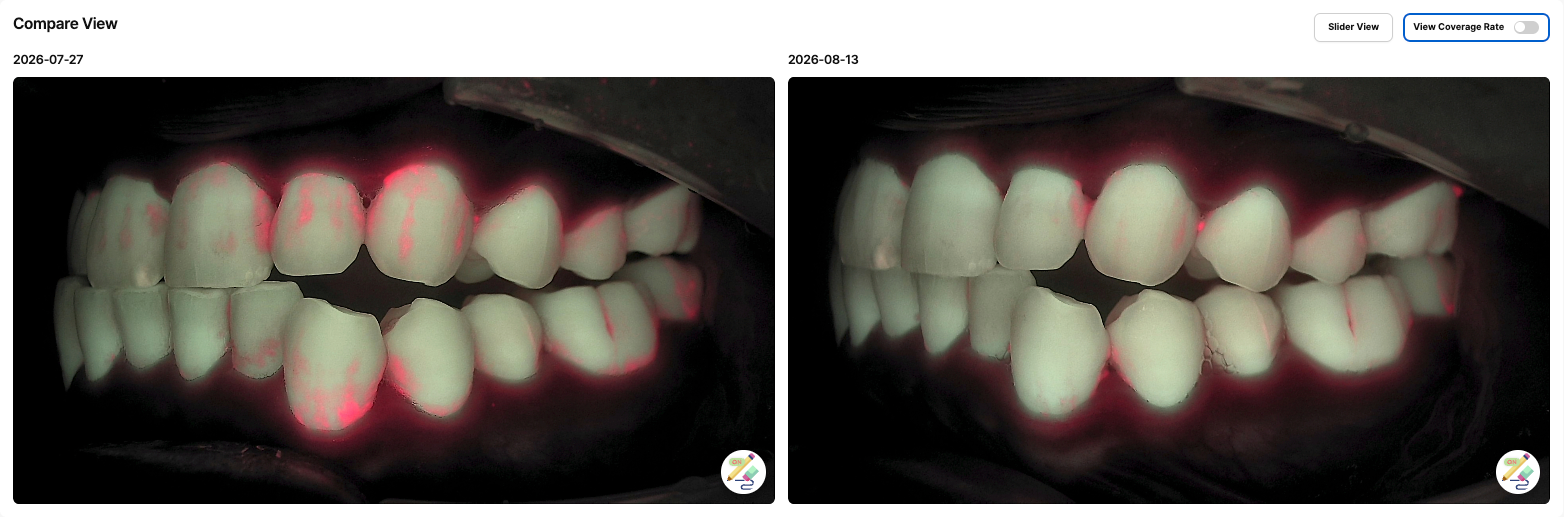
This is the LINKDENS Compare View for a patient in their thirties who had just started a care plan, with lateral Qray fluorescence images taken 17 days apart. On July 27, red fluorescence shows on the labial surfaces and cervical areas of the upper teeth and around the lower canine and premolars. On August 13, the same sites show noticeably less red. Between visits, the patient was using Qscan Plus at home to see which areas needed attention while changing their brushing routine.
Keep what you observe separate from why you think it happened. The two images were taken from the same side, but distance and angle aren't perfectly identical. So the observation ("less red is visible") and the interpretation ("home care has changed") are explained separately. Images taken at home show the patient where to focus; like-for-like comparison happens between images captured in the clinic under the same conditions.
If this screen lives on the patient's phone, the next visit becomes a check-in they're curious about. Patients who see two images side by side usually spot the difference before you say a word. Put that moment in a report, and a third image at the next visit becomes something they want to see. For the capture details that make side-by-side comparison valid, see Intraoral Photo Comparison: Last Visit, Side by Side.
What should you check before sending?
Images are patient health information. Confirm the recipient is the patient or an authorized family member, double-check the phone number, and follow your practice's privacy procedures. Use original captures with no edits that change what the image shows.
Write the report so it informs rather than alarms. Red fluorescence signals mature biofilm; on its own it doesn't mean disease or a need for treatment. Think of it as a traffic light: red says "let's start care here." Pair what you saw with the options the patient has.
The dentist makes the call. The drafted summary is a draft. What goes to the patient should reflect the Qray fluorescence image together with any other exams you needed, reviewed and confirmed by the clinician. Qray fluorescence complements radiographs; it doesn't replace them.
- Confirm the recipient and contact details.
- Choose the images; no edits that change the reading.
- Read, edit, and confirm the drafted summary.
- Add one or two lines on which sites to focus on and how.
- Add which site you'll recheck, and when, then send.
What's next
Once something is visible and it reaches the patient as a report, that image stays in LINKDENS as a record you can pull up and compare at the next visit. For a practice owner, one report extends the chairside conversation all the way home, and turns a single capture into the basis for both explanation and ongoing care. Nobody can promise it will raise rebooking or case acceptance. But when the next thing to check is already on the patient's phone, the reason to come back is easier to explain. As those records build visit after visit and carry into continuous care through QBLISScare, patients become people who follow their own change over time.
FAQ
Q. Does a dental patient report have to go by text message?
A. No. You can print it, send it by text or QR code, or deliver it through the LINKDENS patient app. Choose whatever the patient is most likely to open again at home.
Q. What about privacy when sharing intraoral photos with patients?
A. Treat images as protected health information: confirm the recipient and contact details and follow your practice's privacy procedures. When sending to a family member, confirm the patient (or legal guardian) agrees.
Q. Will sending reports improve patient communication enough to raise rebooking?
A. There's no guarantee. What practices describe is that a concrete, visible reason to come back (this site, compared next time) makes the conversation about the next visit easier.